agent· working · client detached · session held · files synced
You can look away now.
The agent runs in a container on a server your team owns. The files it writes are on your laptop seconds later — in your editor, in your terminal, against your running servers.
A disconnected client whose agent is still producing output is never treated as idle. That is the whole product.
Pre-release. We're onboarding a small number of teams that already run their own infrastructure.
The agent leaves the laptop. The files don't.
A coding agent runs where your machine is, so your machine has to stay open, awake and connected for as long as the work takes. Voyeur splits that in two: the process moves to a server your team runs, and the files stay where you actually work.
Your server
  └── the system
        └── one isolated environment per member
              ├── member A · agent + terminal sessions   ⇅ live sync ⇅   laptop A
              ├── member B · agent + terminal sessions   ⇅ live sync ⇅   laptop B
              └── …
Your laptop stopped being the machine in the loop
It used to be the machine the agent ran on, which is why it had to stay open, awake and connected for as long as the work took. Now it renders your tabs and holds your files, and nothing on the server is waiting on it. Close it mid-task and the only thing that stops is your view of the work.
The session outlives your window
A disconnected client whose agent is still producing output is never idle — a hard rule, because it is the entire point. Shut the lid, change networks, come back: the tabs return with their scrollback.
The files land on your machine in seconds
The agent writes on the server; sync brings the result down within seconds. The console you debug in stays your own — your servers, your tests, your tools.
Your machine keeps the repository
.git is never synced. History moves one way, laptop to server, so the agent can read the log, the diff and the blame while your credentials never leave your desk.
One team key, and nobody on the team sees it
The admin configures the provider once, from inside the product. The key is injected into each environment and refuses to print itself through any formatting path, so it stays out of logs.
Sharing a workspace is membership, not a shared folder
Each member gets the workspace in their own isolated environment, with their own clone. Nobody’s uncommitted work lands in someone else’s tree.
Environments nobody is using get out of the way
No client attached and no agent output for 48 hours, and the environment hibernates — then wakes fast enough that you do not notice it had.
Three screens, and you know what it does.
The running product, on a live installation. Host, paths and names are anonymised; nothing else is staged.
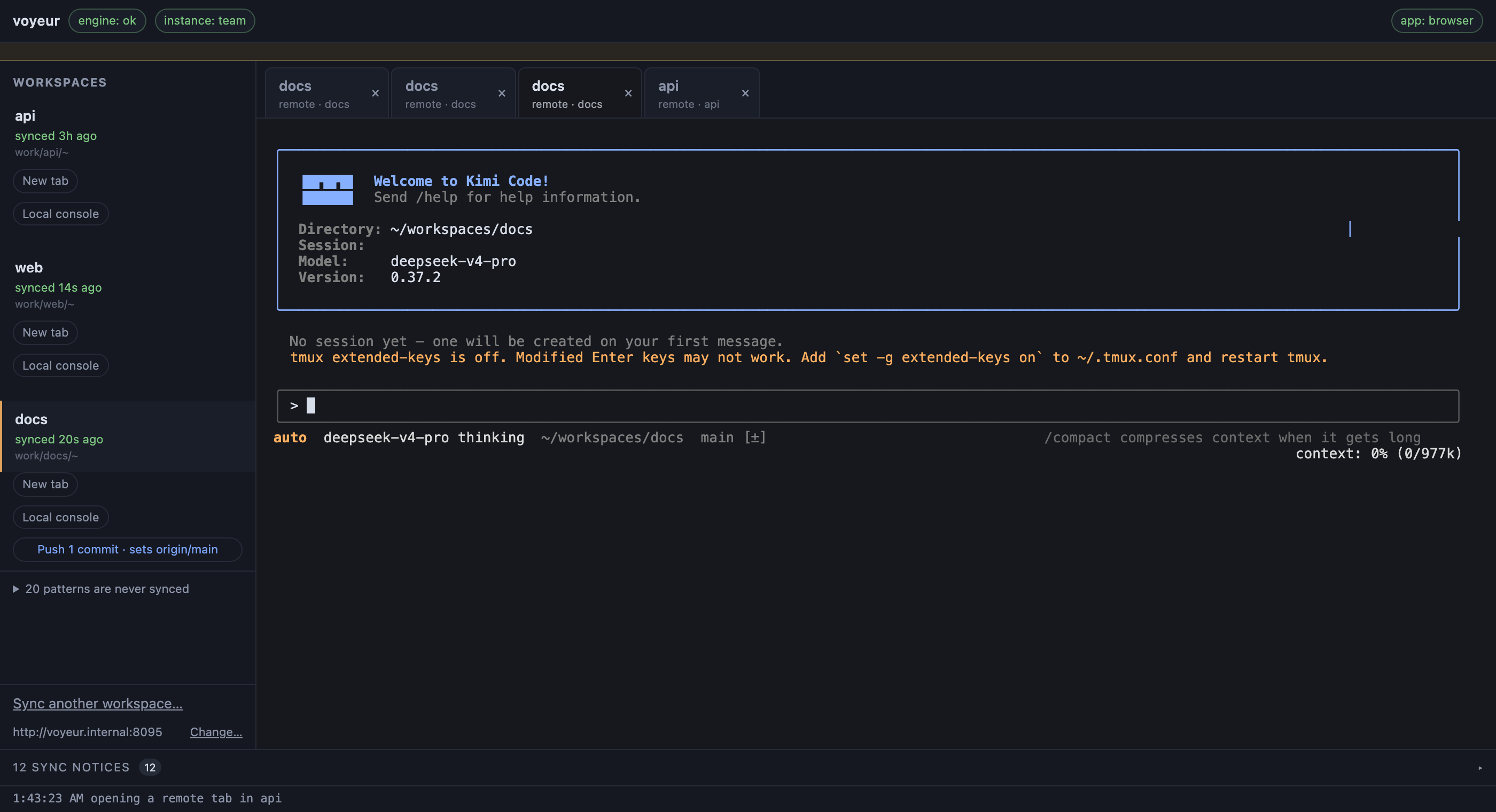
The agent runs on the server
Tabs stream from a container on your installation, held open independently of your window. Nothing here runs on the laptop that took the screenshot.
- Connected — the server has opened this member's environment.
- Several tabs, one workspace — each keeps its own conversation, in a directory that lives on the server.
- synced 27s ago — every workspace is timed, so you know how stale your copy is.
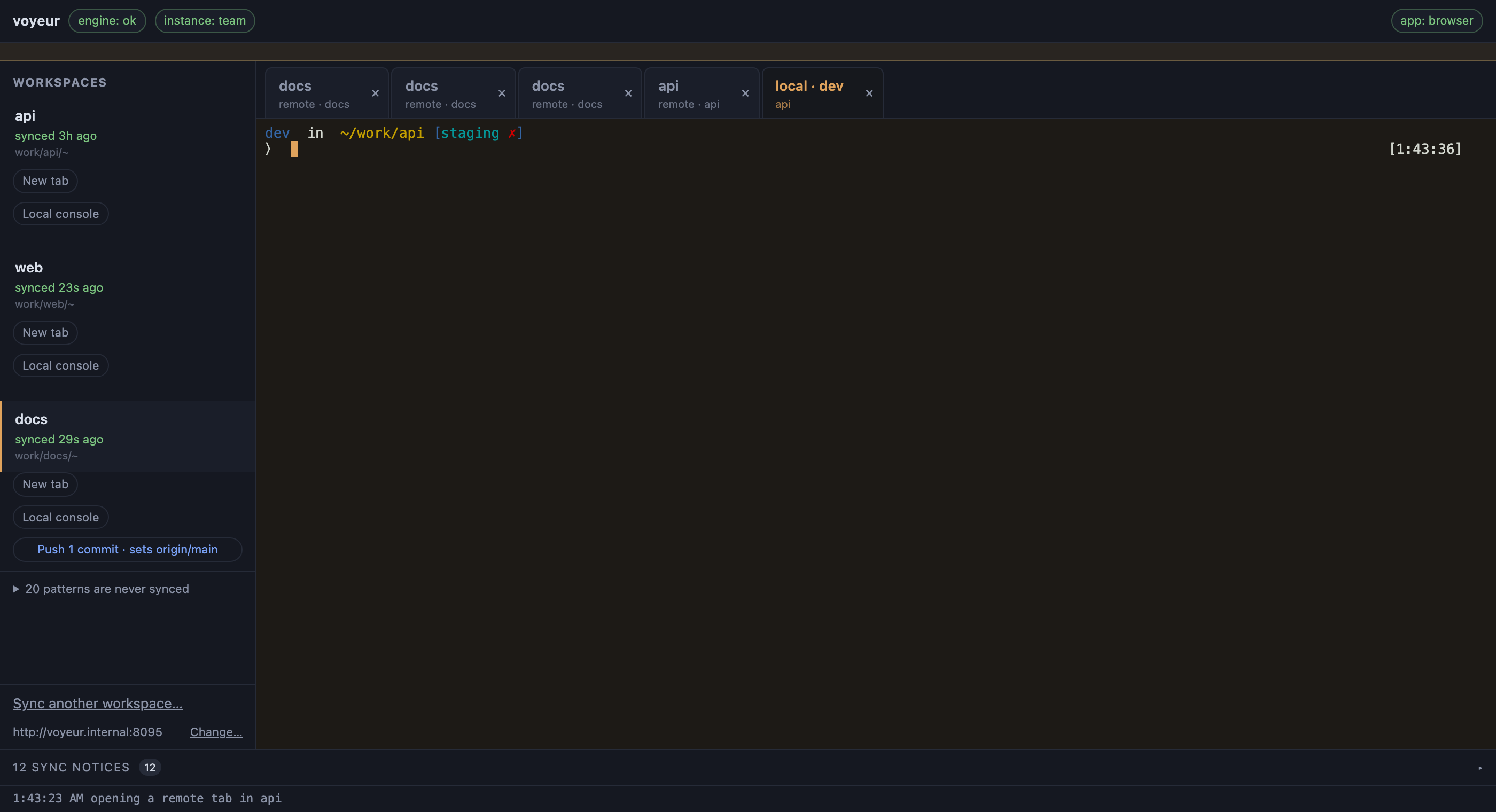
Your console, on your machine, on their files
Your own shell — same prompt, same tools — pointed at a directory an agent somewhere else just edited.
- A local tab — a real shell on your own machine, sitting beside the remote ones.
- syncing · 2 files — the transfer is reported as it happens.
- Push 1 commit — the repository stays yours; history moves one way, laptop to server.
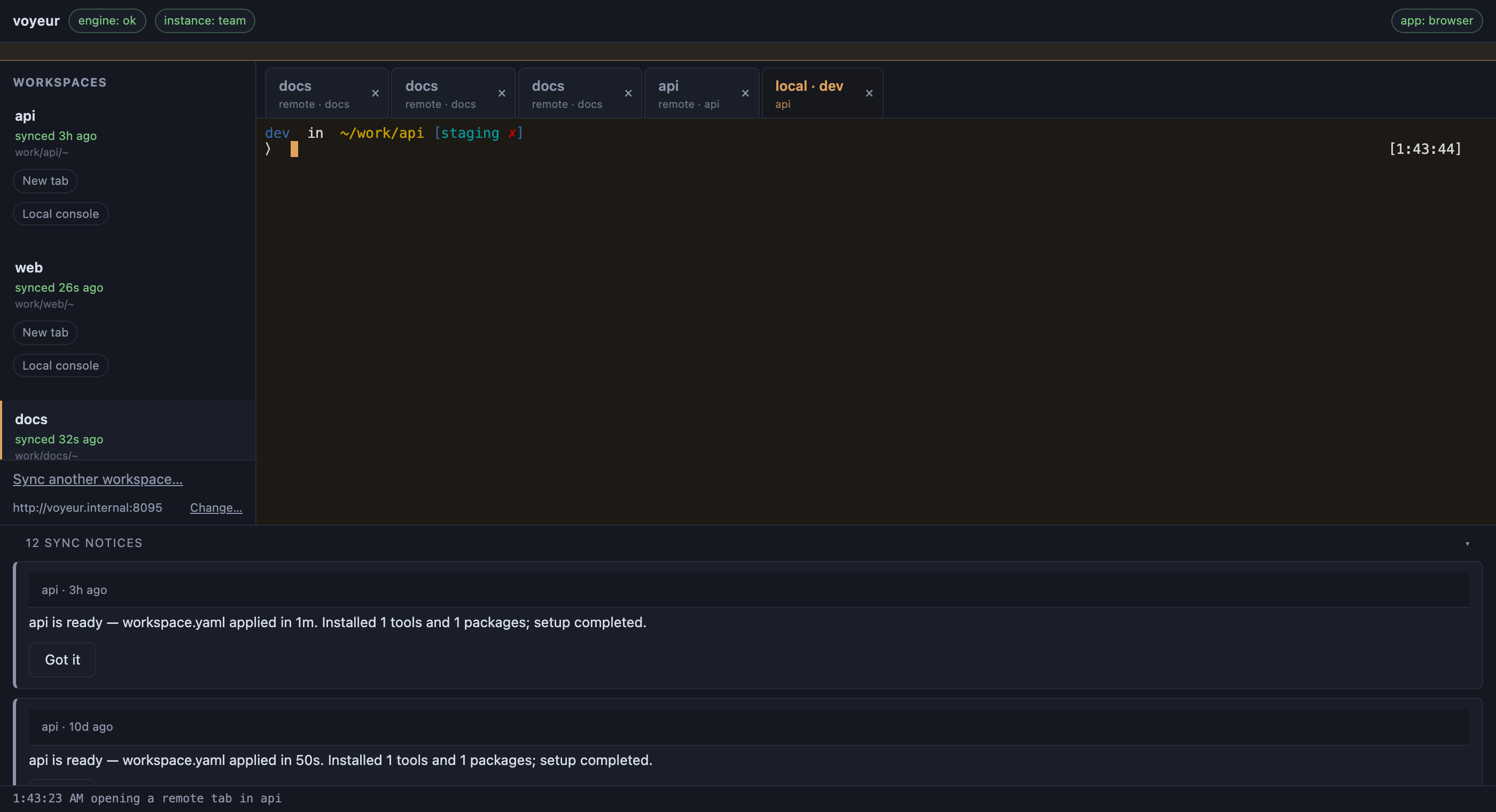
The sync says what it did — and what it refused
Sync is not silent. It reports setup, transfers and what it will never touch, so a missing file is a message rather than a mystery.
- Ready in about a minute — declared tools and packages installed, and it said so.
- 20 patterns are never synced — the refusals are listed, not hidden.
What holds up, and how fast it comes back.
Measurements, not benchmarks — the numbers we have, not the ones we hope for. One Linux server, one installation; yours will differ.
0.59s
connect → tab ready
1.67s
connect → agent responding
0.44s
reconnect after a server restart
0.70s
wake from hibernation
First byte of live output: 0.21s. Coming back has to be immediate, or people leave the laptop open — the habit the product exists to break.
Where the cost sits
A per-seat bill grows with headcount. Usage grows with work done.
Take your current agent bill and ask which of the two it grows with.
| Billed for | work done, not seats held |
|---|---|
| The provider credential | held by the admin; members never see it |
| Spend is attributed to | the project, not the person |
| Who runs the server | you — your infrastructure, your account |
Tell us the team size and what you self-host today. We will say plainly if yours is not a fit yet.
Where the integration stands.
Pre-release, and specific about it. The core is built, running daily and measured; what you see above is the product, not a mockup. It is not open to the public yet.
Integrated and working
- Server-side sessions with multiple tabs and reconnect
- One isolated environment per member, with the team credential injected
- Hibernation and wake
- Bidirectional live sync, with the repository kept one-way
- The desktop app, and the local console beside remote tabs
- Per-workspace environment setup from a declared config
In progress
- A full week of daily use by a second team, on one shared installation and one shared key
- Per-member usage visibility for whoever pays the bill
Not there yet
- Accounts, teams and roles
- Recovery from an unplanned power cut: a planned restart keeps your tabs, an unexpected one does not
- Encryption at rest for the stored provider key
- Windows on the desk — macOS and Linux only for now